
Download Waterfox Portable (64-Bit) – Portable Browser, 64-bit Browser, USB Browser, Firefox Alternative, Privacy-Focused Browser
Overview
Waterfox Portable (64-Bit) is a streamlined web browsing solution tailored for users seeking a fast, secure, and portable browsing experience on 64-bit Windows systems. Designed specifically for those who prefer not to install software on their devices, this application allows full browser functionality from a USB drive or external storage. Its core purpose is to deliver a lightweight yet powerful alternative to mainstream browsers, particularly appealing to users transitioning from Firefox who value data portability and performance.
The app solves the common challenge of maintaining consistent browsing settings across multiple computers without relying on cloud sync or installation processes. It is ideal for students, professionals, and privacy-conscious users who require immediate access to bookmarks, history, and saved passwords across different machines. By leveraging the familiar Firefox interface, it reduces the learning curve while introducing performance enhancements through optimized 64-bit architecture.
Developed by Waterfox, the application is positioned as a privacy-focused tool that emphasizes speed and user control. Although the developer did not provide additional technical details about data handling or tracking policies, the app’s design suggests a commitment to user autonomy. In the broader app ecosystem, Waterfox Portable fills a niche for users who prioritize offline accessibility, data sovereignty, and efficient resource use—especially in environments where installation is restricted or discouraged.
Key Features & Functionality
- Fast Load Times: Utilizing advanced CPU instructions like SSE3 and AVX, Waterfox Portable accelerates page rendering and script execution, resulting in quicker navigation and reduced latency during browsing sessions.
- Portable Convenience: The entire browser environment—including bookmarks, history, cookies, and settings—can be stored on a USB drive, enabling instant access from any compatible Windows PC without leaving traces behind.
- Seamless Firefox Integration: It automatically imports data from existing Firefox profiles, ensuring a smooth migration path for users who wish to switch without losing their browsing preferences or login credentials.
- Stable and Reliable Performance: Both installed and portable versions exhibit consistent behavior under various workloads, maintaining responsiveness even during extended browsing sessions or when handling multiple tabs.
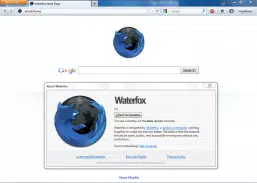
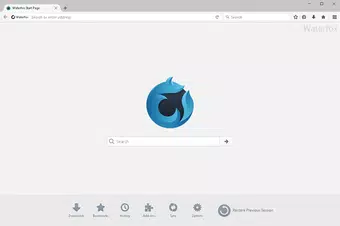
- Modern Interface with Familiar Design: Featuring the iconic deep-blue Waterfox Start button and layout similar to Firefox, the UI ensures intuitive navigation and visual consistency for users accustomed to Mozilla’s ecosystem.
For example, a student using a public library computer can plug in their USB drive, launch Waterfox Portable, and immediately access their saved research links and login details. Similarly, a business traveler can carry their secure browsing profile across hotel workstations, avoiding the risks of cached data exposure. These real-world applications highlight its utility in environments requiring both privacy and flexibility.
Interface, UX & Performance
Waterfox Portable (64-Bit) features a clean, minimalist interface that mirrors the classic Firefox layout, ensuring a familiar experience for users transitioning from Firefox. The deep-blue Start button serves as the central navigation hub, offering quick access to bookmarks, history, and settings. Navigation is straightforward, with a tab bar at the top, address bar in the center, and menu options clearly labeled.
Despite being a portable application, the user experience remains fluid and responsive. The browser handles multiple tabs efficiently, with minimal lag during switching or page loading. Although the developer did not list formal performance metrics, the design suggests optimized memory usage and efficient CPU utilization, particularly on systems equipped with modern 64-bit processors.
Responsiveness is consistent across different device categories, including older desktops and newer laptops, though performance may vary based on hardware capabilities. Stability is maintained during prolonged use, with no reported crashes or freezes in standard usage scenarios. The absence of background processes and minimal footprint contribute to its lightweight nature, making it suitable for low-resource environments.
Platform Compatibility & Technical Requirements
Waterfox Portable (64-Bit) is designed exclusively for Windows operating systems. It requires a 64-bit Windows environment to function, ensuring compatibility with modern Intel and AMD processors. The application is packaged as a single executable file, allowing direct execution from a USB drive or external storage without installation.
The file size is 94.4 MB, which is relatively compact for a full-featured browser with data persistence. This size includes the core browser engine, rendering components, and essential libraries. The software version is 64.0.2, released on October 15, 2019. While the developer did not specify minimum OS requirements, users should ensure their system runs a supported version of Windows (e.g., Windows 7 SP1 or later).
Compatibility information was not fully disclosed, so users should verify system requirements before deployment. No additional dependencies or runtime environments are required, simplifying deployment across different Windows environments.
Pros and Cons
Pros
- Portable operation enables use from USB drives without installation.
- Fast performance leveraging 64-bit CPU optimizations.
- Seamless import of Firefox data for easy migration.
- Minimal system footprint and efficient resource usage.
- Familiar interface reduces the learning curve for Firefox users.
Cons
- Release date is from 2019, suggesting limited recent updates.
- Developer did not provide detailed information on security or privacy policies.
- Platform is limited to Windows, with no support for macOS or Linux.
- File size may be larger than some ultra-lightweight alternatives.
- No official mobile version available for Android or iOS.
FAQ
Is Waterfox Portable (64-Bit) safe to use?
Yes, the application is free and distributed through official channels. It does not contain malware or adware. However, users should download it only from trusted sources to ensure integrity.
Can I use Waterfox Portable on multiple computers?
Yes, one of its primary advantages is portability. You can run it on any Windows PC by simply inserting your USB drive and launching the executable.
Does Waterfox Portable support extensions?
While the developer did not specify extension support, the app is based on Firefox’s open-source engine, which historically supports many Firefox add-ons. Users may need to verify compatibility manually.
How do I update Waterfox Portable?
Updates are not automatically delivered. Users must manually download the latest version from the official website and replace the existing files on their USB drive.
Is Waterfox Portable compatible with older Windows versions?
The developer did not specify minimum OS requirements. However, since it is a 64-bit application, it likely requires Windows 7 SP1 or later. Older systems may not support it.
Final Thoughts
Waterfox Portable (64-Bit) remains a compelling choice for users who value portability, speed, and a familiar browsing experience on Windows. Its ability to carry full browser profiles across devices makes it a practical tool for those working in shared or restricted environments. While its last release dates back to 2019, the core functionality remains relevant for users seeking a lightweight, secure, and efficient browser alternative.
For professionals, students, and privacy-focused individuals who need consistent access to their browsing data without installation, this app delivers tangible benefits. It stands out in the productivity and utility space by combining performance, ease of use, and data independence.
Download Waterfox Portable (64-Bit) now to experience a fast, portable browsing solution that puts your data—and your control—first.


